

From pending item to next step
What is missing, why, and how to act.
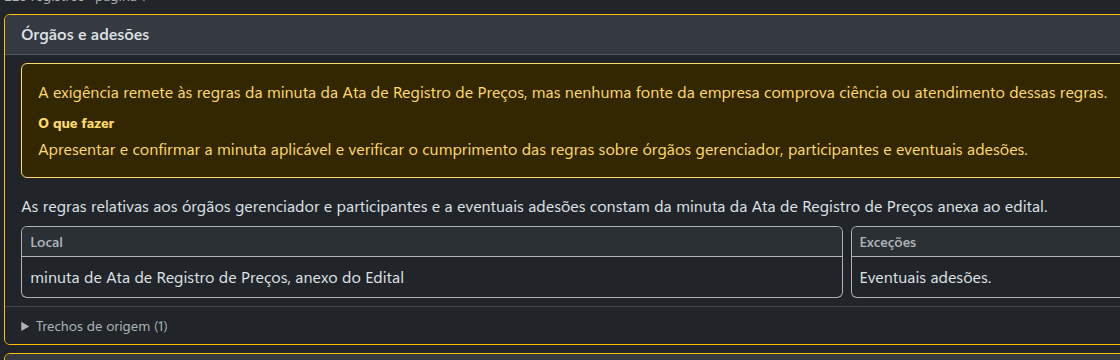
Each pending item explains the reason and suggests what to do. The tender excerpt sits alongside for you to check.
 Enlarge screenshot
Intelligence for companies that sell to the government
Compare the tender's requirements with your company's data and documents. See what is pending, the next steps and the evidence to prepare your bid.
Search by product, service and region. No sign-up.
| Supplier | Items | Total value | Agencies | Latest |
|---|
| Agency | Items | Purchases | Total value | Latest |
|---|
| State | Results | Median | Suppliers | Agencies |
|---|
| Month | Results | Median |
|---|
Awarded items and results from public purchases (source II of IN SEGES/ME 65/2021). The blocks above add up all similar items in the period; the list shows up to 50. Check the unit of measure and the reference of each result. Unit values are not cleaned up: the range and the exclusion of unworkable or excessive prices are up to whoever does the research.
Requirements, certificates and obligations compared with your CNPJ and your supporting documents. You see where you need to act and what already has evidence of compliance.
 Enlarge screenshot
Each pending item explains the reason and suggests what to do. The tender excerpt sits alongside for you to check.
Enlarge screenshot
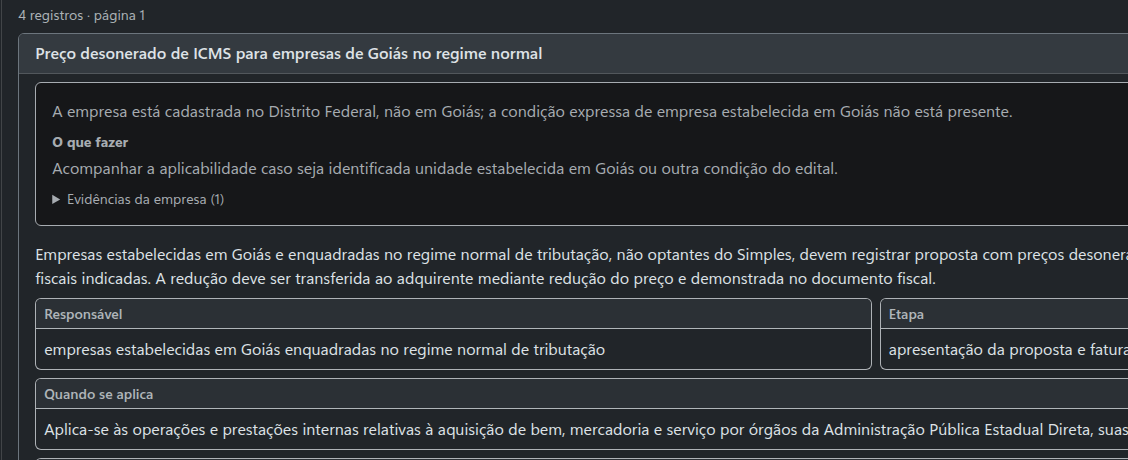
In this example, the rule is for companies in Goiás and the CNPJ is in the Federal District. The analysis explains the difference and shows the evidence.
 Enlarge screenshot
Prepare the supporting documents once and pick your CNPJ when you analyse each tender.
Search by the company's name or number.
Add certificates and other PDF documents.
Open Requirements in the tender and check the results.
Pick a purchase similar to what your company supplies. Explore the tender notice, the data and the requirements; compare them with the original and download the files. No sign-up or payment.
Loading examples…
All examples and downloadsA dossier with the data, requirements, certificates and deadlines, organized. Check each piece of information in the excerpt and on the source page.
See what I getDossier included with access to the tender notice. See pricing
Say what your company supplies or use suggestions from your CNPJ. Adjust the filters and get new tenders on the site or by email.
Create my alertYour first alert is free.
New documents, value changes and postponed deadlines: follow the purchases that matter to you and get notified.
Follow tendersYour first follow-up is free.
Prefer to browse? Explore the catalog by procurement type, state and municipality (in Portuguese).
Keep this code somewhere private. It gives access to your saved purchases and your alerts in another browser.
webhook-id, webhook-timestamp, webhook-signature). You can read it again here; rotation keeps the previous one for 24 h.The code is checked before this browser's access changes.
Up to 200 purchases. Saving is free and does not turn on notifications.